
The short answer
Use a private APN that works across more than one mobile network. Instead of tying every site to one operator, Adapt IT Telecoms’ APN-as-a-Service lets each site use the network that covers it best, while every device still connects through the same secure, private route into your company systems. You manage every SIM, data allocation and access rule from one platform, pay only for the data you use, and see consumption by site in near real time.
-
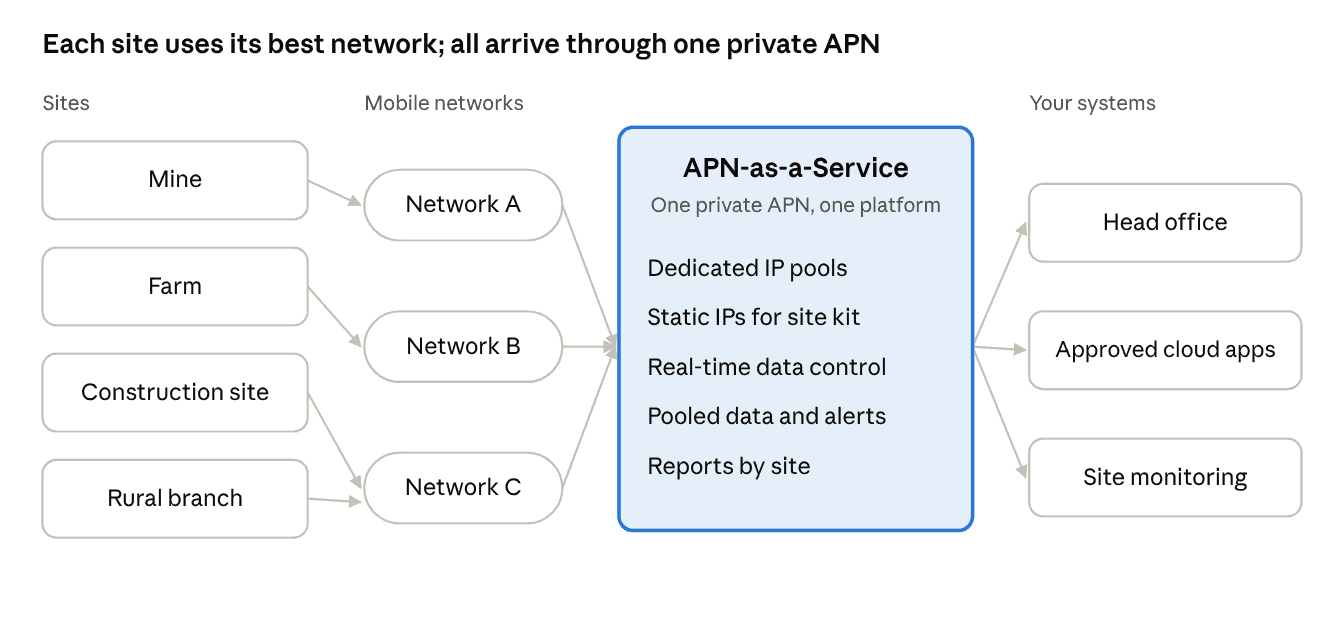
The best network for each site: Multiple South African mobile networks are supported, managed as one service.
-
One private route: Site devices reach your approved systems, not the open internet.
-
One platform: Every SIM, rule and report across every network, in one place.
-
Spend you can see: Pooled data, real-time control and alerts before a site overspends.
Why do remote sites lose connectivity?
Most remote sites depend on a single mobile network, so any gap in that network’s coverage, or any outage at the nearest tower, takes the site offline with no fallback.
Mobile coverage in South Africa varies by operator and by area. A mine, farm, construction site or rural branch often sits where one network is strong and another is weak. Yet company data contracts usually tie every SIM to one operator, whatever the coverage at each site.
Outages make it worse. Base stations run on backup batteries when grid power fails, and those batteries and the sites around them have long been targets for theft and vandalism. Eskom expected no load-shedding over winter 2026, but a local power fault or a stolen battery can still take a tower down. A site that depends on one network has nowhere else to go.
Two further problems tend to follow. Data spend at each site is invisible until the bill arrives. And equipment at the site, such as cameras, gateways and controllers, is either exposed on the open internet or cannot be reached from head office at all.
How does a multi-network private APN keep remote sites connected?
It separates two choices that are usually tied together: which mobile network carries a site’s data, and how that data reaches your business.
An Access Point Name (APN) is the setting that tells a mobile device which gateway to use for data. A private APN sends your devices through your own controlled route to company systems, instead of over the open internet.
Adapt IT Telecoms’ APN-as-a-Service supports multiple mobile network operators. Each site’s SIMs can sit on the network that covers that site best, yet all traffic arrives through the same private APN, with the same rules. Because the service is cloud-based and spans networks, moving a site to a different network doesn’t change how it connects to your systems.
What do remote sites get from APN-as-a-Service?
Remote sites get a choice of network, a private route to company systems, and real-time control of data, all managed from one platform.
|
Feature |
What it does at a remote site |
|---|---|
|
Multi-network support |
Put each site on the network with the best coverage there, and keep other networks as options |
|
Private APN with dedicated IP pools |
Site devices reach only your approved systems, not the open internet |
|
Give site equipment such as gateways, cameras and controllers fixed addresses, so head office can reach it reliably |
|
|
Real-time, in-session data control |
Change a site’s data allocation as it happens, without waiting for a new bundle |
|
Pooled data |
Sites share one data pool, so a busy site draws on the pool instead of running out |
|
Soft locks and alerts |
Get warned before a site overspends, and set limits per site or device |
|
Reporting by site, department or device |
See consumption across every network in one report |
|
API integration |
Feed usage and SIM data into your own systems |
Billing follows the same logic: you pay for the data your sites actually use, not for a fixed bundle on every SIM.
How quickly can remote sites be connected?
APN provisioning, business rules and SIM deployment are operational within five business days.
-
Map your sites and coverage. List each site, the devices it runs and which mobile networks are strongest there.
-
Set up the private APN. Adapt IT Telecoms provisions your APN and IP pools, with static addresses for equipment head office needs to reach.
-
Define business rules. Set data allocations, alerts, soft locks and access rules per site, department or device type.
-
Deploy SIMs. SIMs on the chosen network for each site go into its routers and devices.
-
Monitor and adjust. Watch usage by site in near real time and move allocations as needs change.
What can a private APN fix, and what can’t it?
A multi-network APN improves your options wherever at least one mobile network reaches a site. It cannot create coverage where no network reaches.
-
One network weak, another strong: The site runs on the stronger network, under the same private APN and rules as every other site.
-
All networks weak: An external antenna may help, or the site may need a different primary link such as fixed wireless or satellite. The APN still manages any mobile devices there.
-
A fixed link already in place: Mobile SIMs on the private APN can serve as a backup path into the same private network if the main link fails.
That is why the first step is always a coverage check per site.
How do you know your remote sites need this?
The clearest sign is a site that goes offline whenever its one network has a problem.
-
A site loses connectivity when its network has an outage, with no fallback.
-
Some sites sit where your contracted network is weak but another network is strong.
-
You can’t see data use per site until the bill arrives.
-
Site equipment is exposed on the open internet, or can’t be reached from head office at all.
-
Data bundles run out at busy sites while others go unused.
Frequently asked questions
What is a private APN? An Access Point Name (APN) is the setting that tells a mobile device which gateway to use for data. A private APN sends a business’s devices through its own controlled route to company systems, instead of over the open internet.
Can one APN work across more than one South African mobile network? Yes. Adapt IT Telecoms’ APN-as-a-Service supports multiple mobile network operators, and all SIMs are managed on one platform under the same private APN and rules.
Will a multi-network APN give us coverage where there is no signal? No. It lets each site use whichever network reaches it best. Where no mobile network reaches a site, you need an external antenna or a different link, such as fixed wireless or satellite.
Can head office reach equipment at remote sites? Yes. Static IP addresses on the private APN give site equipment such as cameras, gateways and controllers fixed addresses that your systems can reach securely.
How is data billed? You pay for the data your sites use, pooled across the business, rather than a fixed bundle on every SIM. Reports show consumption by site, department or device across every network.
How long does setup take? APN provisioning, business rules and SIM deployment are operational within five business days.